What is secure boot?
Secure boot is one of those topics that sits at the intersection of embedded software, system security, and real products. Everyone has heard of it. Many projects mention it. Fewer actually implement it correctly, especially on bare-metal microcontrollers.
This post does two things:
- Explains what secure boot really means on a bare-metal Cortex-M MCU
- Introduces a reference kit that demonstrates this flow end-to-end
- ⭐ If you’re a hobbyist or learner, this will help you understand why secure boot exists and how it works.
- ⭐ If you’re working on a serious prototype or early product, it will also show what a minimal, correct baseline looks like.
What “secure boot” actually means on a bare-metal MCU
At its core, secure boot answers one simple question:
Should this firmware be allowed to run on this device?
On a PC or smartphone, secure boot is handled by firmware layers, ROM code, and complex certificate chains. On a bare-metal Cortex-M MCU, you are responsible for that decision.
- ➡️ There is no OS.
- ➡️ There is no background service.
- ➡️ There is no safety net.
Whatever runs after reset is whatever your boot code allows to run. It’s tempting to think secure boot only matters for commercial or high-security devices. In reality, secure boot teaches foundational embedded concepts that apply everywhere:
- Flash layout discipline: Where does the bootloader end and the application begin?
- Image formats: How does code identify what it’s about to execute?
- Failure behavior: What happens if validation fails? Do you crash? Loop? Halt safely?
- Determinism: Can you reproduce and test failure cases reliably?
These are not “security-only” ideas. They are core embedded engineering skills. That’s why secure boot is such a valuable topic for learners: it forces you to think clearly about reset-time behavior, memory ownership, and control flow.
Minimum bare-metal secure boot flow
A minimal secure boot flow on a microcontroller looks like the following diagram:
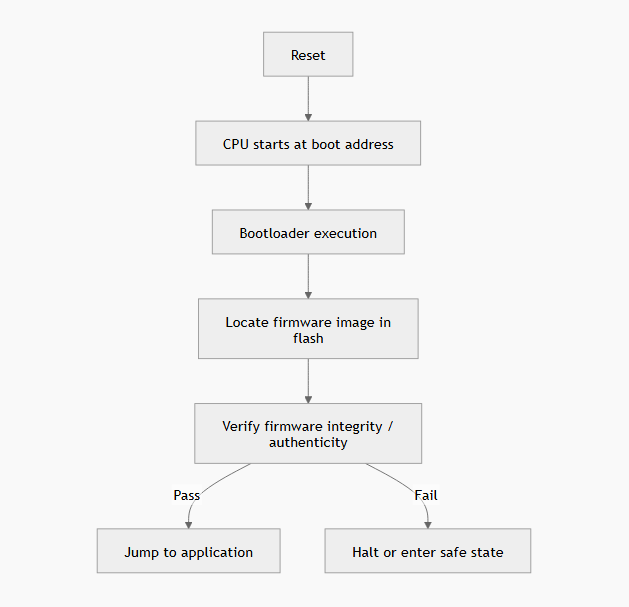
This diagram shows what happens when a bare-metal MCU powers up: after reset, the CPU starts at the boot address and runs the bootloader. The bootloader finds the firmware in flash, checks whether it’s valid, then makes a simple decision: run it if it passes, or stop / go to a safe state if it fails.
One thing to note is that there is no scheduler, no daemon, and no fallback process. If you get this logic wrong, the device will happily execute corrupted or malicious firmware.
Where most secure-boot tutorials fall short
If you search for “Cortex-M secure boot,” you’ll usually find one of two things:
High-level explanations
Hashes, signatures, threat models, but no runnable code.
Vendor-specific examples
Tightly coupled to a specific ROM bootloader, SDK, or TrustZone flow.
What’s usually missing is the middle ground:
- a portable bare-metal reference
- written in plain C
- with a clear boot decision point
- observable pass/fail behavior
In other words: something you can flash, break, and reason about.
Bridging theory to practice: what a real demo should show
A useful secure boot example should let you answer these questions confidently:
- What exactly is verified at boot?
- What happens if the image is modified?
- Where does the bootloader stop and the application begin?
- How do I prove the system refuses to run bad firmware?
If you can’t deliberately corrupt the image and watch the system reject it, you don’t really know if secure boot is working. That gap between theory and practice is what motivated the kit described below.
Proof first: what actually happens at boot
The reference implementation demonstrates the following behavior:
- A valid firmware image boots normally
- A single-byte modification causes validation failure
- Control never jumps to the application on failure
- The failure path is deterministic and testable
This diagram explains what secure boot means in the embedded world:
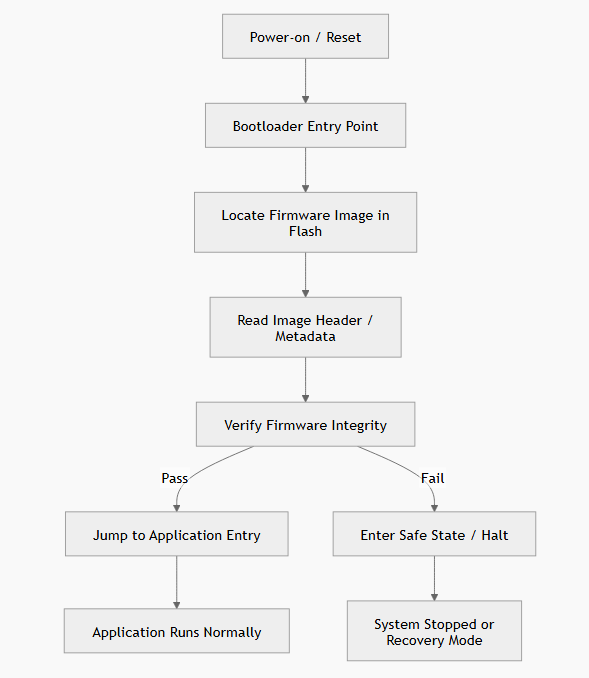
On a bare-metal MCU, secure boot is not a service or a background task. It is a single decision point executed immediately after reset. If verification passes, execution continues. If it fails, execution must not proceed.
Example output:
[BOOT] Image header found
[BOOT] Hash computed
[BOOT] Image validation OK
[BOOT] Jumping to application
And for a tampered image:
[BOOT] Image header found
[BOOT] Hash mismatch
[BOOT] Validation FAILED
[BOOT] System halted
This is not a conceptual diagram. It is compiled, flashed, and exercised code.
Introducing the Cortex-M Bare-Metal Secure Boot Kit
To make this flow reusable and easy to study, I packaged it into a small Cortex-M bare-metal secure boot reference kit. This secure boot kit gives you a small, readable bare-metal bootloader for Cortex-M that makes one clear decision at reset: run the firmware if it’s intact, or refuse to run it if it’s been modified.
You can flash it, break the firmware on purpose, and watch the system reject it. It’s meant to help learners understand secure boot by running real code, and to give startups a clean baseline they can extend and harden later. The goal is not to sell a “black box,” but to provide:
- readable C code
- a concrete image format
- a clear validation decision
- documentation that explains why things are done this way
This following diagram shows what makes this kit concrete and educational:
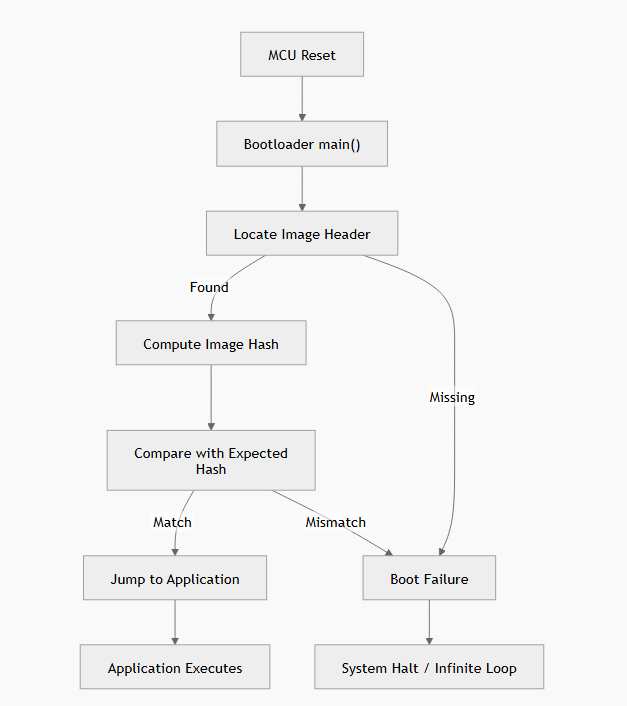
The above flow makes three important points:
| Key Highlight | Description |
|---|---|
| The boot decision is explicit | No fall-through. No undefined behavior. |
| Tampering is observable | A one-byte change forces the failure path. This is testable, not theoretical. |
| The failure path is intentional | The system refuses to execute. Not “crash and hope.” |
🔥 This is exactly the behavior beginners struggle to visualize without a real reference.
What’s inside the kit
The kit is delivered as a clean ZIP and includes:
| Component | Description |
|---|---|
| Bare-metal bootloader reference | Explicit flow: locate -> validate -> decide -> handoff |
| Firmware image format | Header layout, versioning fields, integrity metadata |
| Validation logic | Hash-based integrity check |
| Explicit failure behavior | No silent fall-through |
| Flash layout & linker examples | Bootloader vs application regions; alignment and vector-table considerations |
| Runnable demo | Valid image boots; modified image is rejected |
| Negative tests | Corruption scenarios; boundary conditions |
| Beginner-friendly documentation | Boot flow explanation, flash layout rationale, notes on how to adapt the design |
- ➡️ For learners, this is a study-and-flash kit.
- ➡️ For indie developers, this is a serious baseline for a prototype.
- ➡️ For startups, it’s a clean baseline to build and harden further.
What this kit is and is not
This kit is: ✔️
- a Cortex-M bare-metal secure boot reference
- readable, modifiable, and educational
- suitable for prototypes and early designs
This kit is not: ❌
- a turnkey production secure-boot solution
- a full PKI or signing infrastructure
- a vendor ROM or TrustZone replacement
- a certified security product
Think of it as the missing middle layer between theory and production.
Get the Secure Boot Kit
The Cortex-M Bare-Metal Secure Boot Kit is available as a one-time download.
- Price: $49.99 CAD
- Format: ZIP package
- License: personal / internal use (no redistribution)
- Support: documentation + community discussion
👉 Buy the Secure Boot Kit on Gumroad.
If you’ve ever wanted a secure-boot example that goes beyond slides and actually refuses to run modified firmware, this kit gives you a clean, practical starting point.